@bomb.sh/tty is a low-level, platform-independent terminal renderer and event parser for JavaScript. Use it directly to build full-screen or inline terminal UIs, or as the foundation for your own framework.
Reach for @bomb.sh/tty when you need a rendering engine for terminal UI: layout, styling, diffing, and input parsing, without committing to a particular app framework or I/O model.
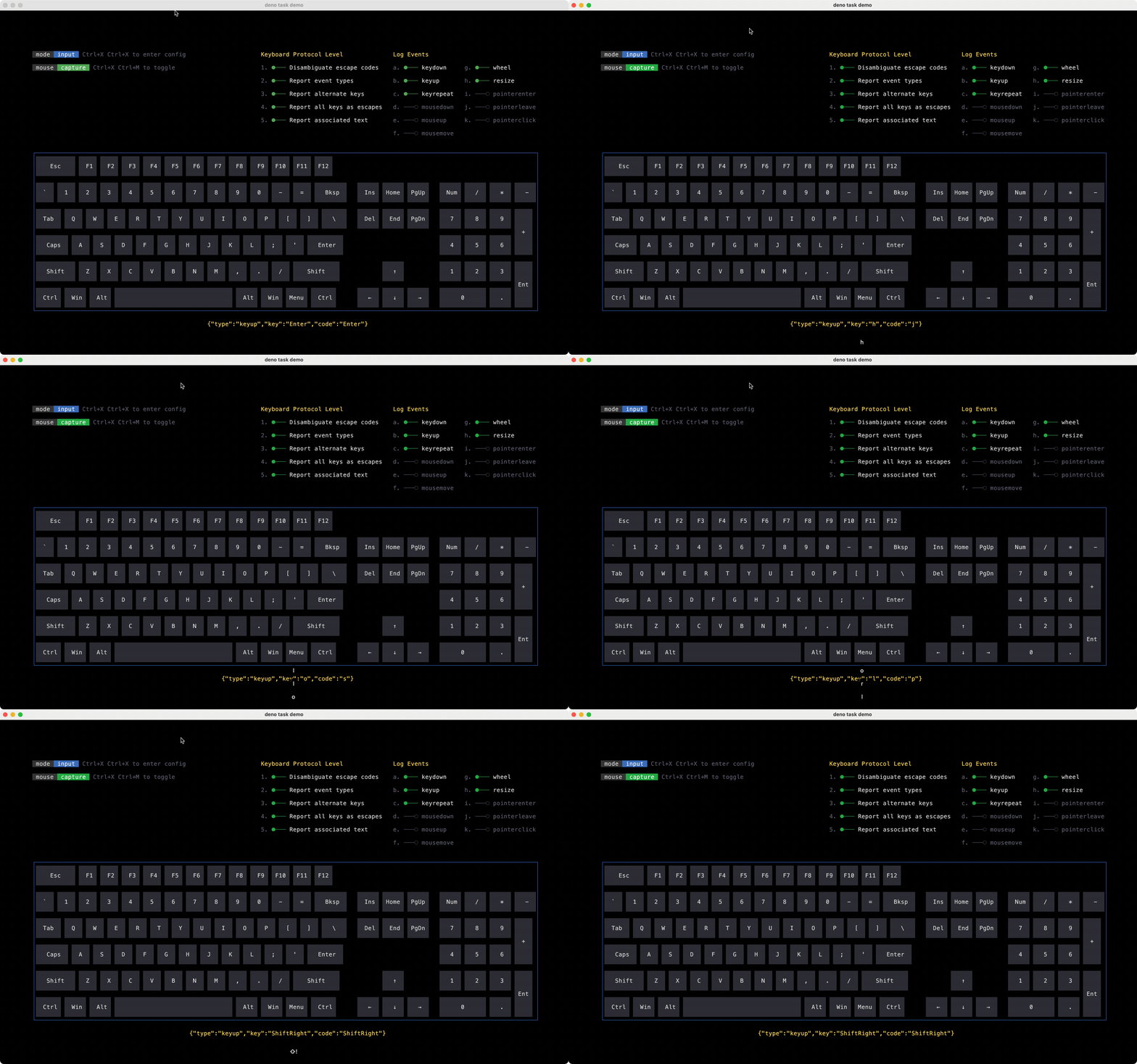
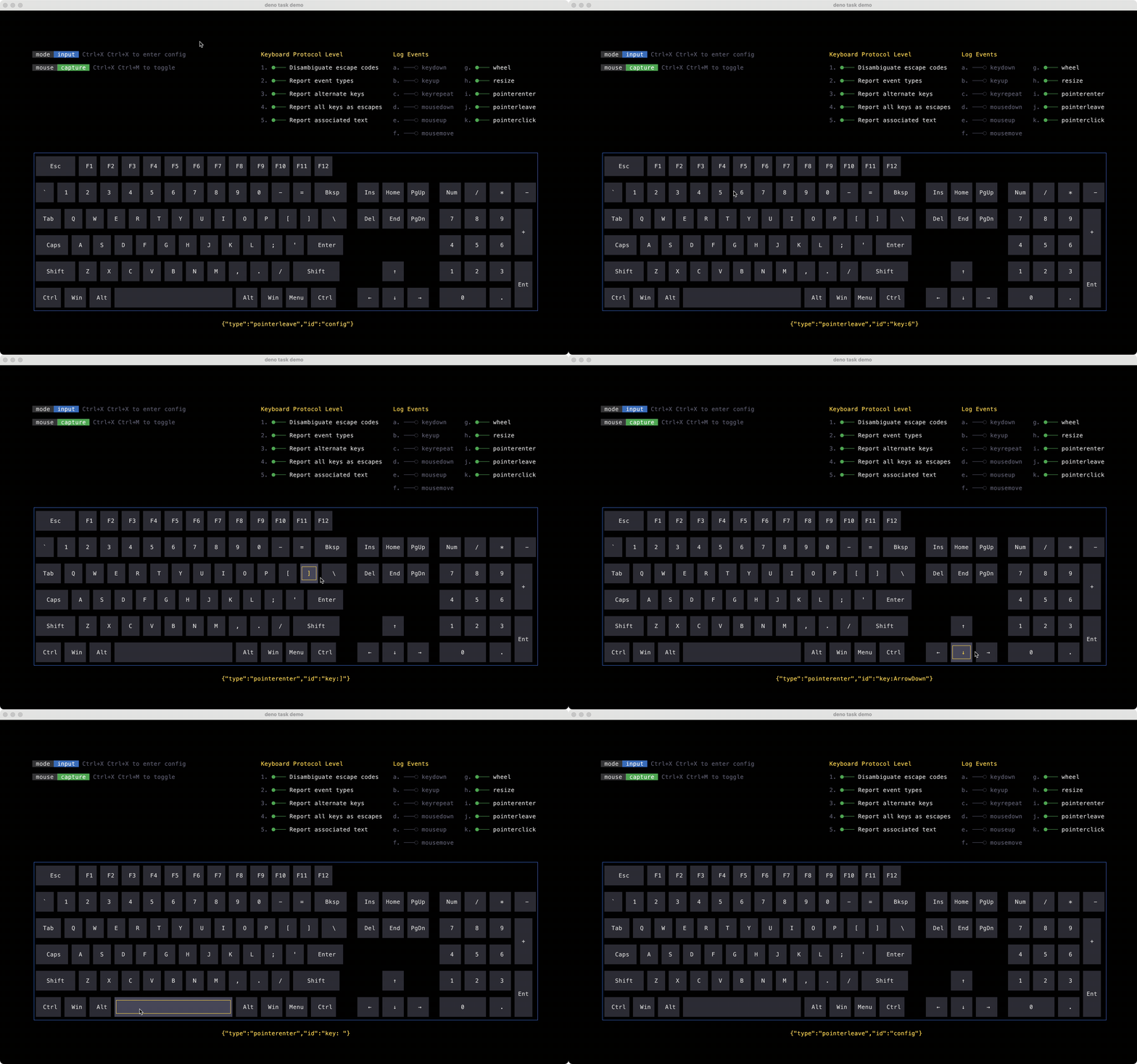
Full-screen applications: Dashboards, tools, and games that take over the alternate screen buffer with layouts, borders, mouse hover, and keyboard input (see the 2048 and keyboard demos)
Inline animated output: Spinners, progress bars, or live status regions embedded in normal scrollback without switching to a full-screen mode (see inline regions)
Rich, structured output: Diff views, panels, sidebars, and multi-pane layouts where hand-written ANSI becomes unmaintainable
Interactive layouts with pointer support: Hover states, clickable regions, and drag-style interactions driven by terminal mouse reporting
Animated UI: Transitions on width, color, position, and other properties with efficient cell-level diffing between frames
Custom TUI frameworks: Zero I/O means you wire stdin/stdout (or any byte stream) yourself; the engine stays a pure compute layer you can embed in Node, Deno, Bun, or the browser
One-shot CLI prompts (text input, selects, confirms): use @clack/prompts; it targets a different problem and uses Node’s built-in tty module, not this package
Component-based UI with state and bindings: use @clack/ui, which is built on @bomb.sh/tty and handles the higher-level framework concerns for you
Frames as snapshots. Each frame is a complete, independent UI description. Build an array of ops (open, text, close), pass it to term.render(), and write the returned ANSI bytes to stdout. The renderer carries layout and diff state between frames, not a persistent component tree.
Zero I/O boundary. You own stdin/stdout. @bomb.sh/tty is pure computation: one WASM call per frame on the output side, and a byte-stream parser on the input side.
Efficient output. Clay runs layout, walks render commands into a cell buffer, and diffs against the previous frame. Only changed cells produce ANSI escape sequences.
The whole design follows from one principle: zero I/O. The engine never reads stdin or writes stdout, you feed it bytes and it hands bytes back. Because the WASM module is pure computation with no I/O, it runs anywhere WebAssembly does: Node, Deno, Bun, or the browser, and it can serve as the foundation for higher-level frameworks.
That principle splits the system into two independent data flows: an output pipeline that turns your UI description into ANSI bytes, and an input pipeline that turns raw terminal bytes into structured events. Your app sits on the outside, owning all I/O:
flowchart LR
  subgraph app ["Your app (owns I/O)"]
    Stdin["stdin.read"]
    Loop["event loop"]
    Stdout["stdout.write"]
  end
  subgraph tty ["@bomb.sh/tty (pure computation)"]
    Term["term.render"]
    Input["input.scan"]
    Settings["settings / termcodes"]
  end
  Loop -->|"ops"| Term
  Term -->|"ANSI bytes"| Stdout
  Stdin -->|"raw bytes"| Input
  Input -->|"events"| Loop
  Settings -->|"mode bytes"| Stdout
Each frame’s ops flatten into a single Uint32Array sent to WASM in one call. Clay performs layout, walks the render commands into a cell buffer, and diffs it against the previous frame. Only changed cells become ANSI escape sequences, so stdout writes stay small even for busy full-screen UIs.
flowchart LR
  subgraph ts [TypeScript]
    Stdin["stdin.read"]
    Events["InputEvent[]"]
  end
  subgraph wasm [WASM]
    Parse["Trie match"]
    Decode["UTF-8 / mouse / ESC"]
  end
  Stdin -->|"raw bytes"| Parse
  Parse --> Decode
  Decode --> Events
Raw bytes are fed into a WASM parser that recognizes VT/ANSI escape sequences, UTF-8 codepoints, and mouse protocols. Partial sequences that arrive across read boundaries are reassembled automatically. A lone ESC byte is held for a configurable latency window (default 25ms) before being emitted.
Each of the five API modules maps directly onto this architecture:
Ops: Pure data builders that describe a frame. Calling open, text, or close has no side effects — it only produces the directives the output pipeline consumes
Term: The output pipeline. Ops go in; ANSI bytes and pointer events come out
Input: The input pipeline. Raw bytes go in; structured keyboard and mouse events come out
Settings and Termcodes: Because you own stdin/stdout, you also own terminal state. These build the escape bytes to apply and revert modes (alternate buffer, cursor, mouse tracking) yourself
Every module is either pure computation or byte construction — none of them touches I/O. That’s what keeps the whole API surface identical across runtimes, and what lets you swap process.stdout for any byte sink you like.
The process.stdout property returns a stream connected tostdout (fd 1). It is a net.Socket (which is a Duplex stream) unless fd 1 refers to a file, in which case it is
a Writable stream.
For example, to copy process.stdin to process.stdout:
import{ stdin, stdout }from'node:process';
stdin.pipe(stdout);
process.stdout differs from other Node.js streams in important ways. See note on process I/O for more information.
Sends data on the socket. The second parameter specifies the encoding in the
case of a string. It defaults to UTF8 encoding.
Returns true if the entire data was flushed successfully to the kernel
buffer. Returns false if all or part of the data was queued in user memory.'drain' will be emitted when the buffer is again free.
The optional callback parameter will be executed when the data is finally
written out, which may not be immediately.
See Writable stream write() method for more
information.
Milliseconds to wait before resolving a lone ESC byte as the Escape
key rather than the start of an escape sequence. Lower values feel
snappier but risk misinterpreting sequences on slow connections.
For reference, Vim's ttimeoutlen defaults to 100ms and ncurses
ESCDELAY defaults to 1000ms. The default of 25ms is tuned for
local terminals where escape sequences arrive within microseconds.
@default ― 25
escLatency:25});
var process:NodeJS.Process
process.
NodeJS.Process.stdin: NodeJS.ReadStream &{
fd:0;
}
The process.stdin property returns a stream connected tostdin (fd 0). It is a net.Socket (which is a Duplex stream) unless fd 0 refers to a file, in which case it is
a Readable stream.
For details of how to read from stdin see readable.read().
As a Duplex stream, process.stdin can also be used in "old" mode that
is compatible with scripts written for Node.js prior to v0.10.
For more information see Stream compatibility.
In "old" streams mode the stdin stream is paused by default, so one
must call process.stdin.resume() to read from it. Note also that calling process.stdin.resume() itself would switch stream to "old" mode.
Allows configuration of tty.ReadStream so that it operates as a raw device.
When in raw mode, input is always available character-by-character, not
including modifiers. Additionally, all special processing of characters by the
terminal is disabled, including echoing input
characters. Ctrl+C will no longer cause a SIGINT when
in this mode.
@since ― v0.7.7
@param ― mode If true, configures the tty.ReadStream to operate as a raw device. If false, configures the tty.ReadStream to operate in its default mode. The readStream.isRaw
property will be set to the resulting mode.
Schedules execution of a one-time callback after delay milliseconds.
The callback will likely not be invoked in precisely delay milliseconds.
Node.js makes no guarantees about the exact timing of when callbacks will fire,
nor of their ordering. The callback will be called as close as possible to the
time specified.
When delay is larger than 2147483647 or less than 1 or NaN, the delay
will be set to 1. Non-integer delays are truncated to an integer.
If callback is not a function, a TypeError will be thrown.
This method has a custom variant for promises that is available using
timersPromises.setTimeout().
@since ― v0.0.1
@param ― callback The function to call when the timer elapses.
@param ― delay The number of milliseconds to wait before calling the
callback. Default:1.
@param ― args Optional arguments to pass when the callback is called.
@returns ― for use with clearTimeout()
setTimeout>|undefined;
var process:NodeJS.Process
process.
NodeJS.Process.stdin: NodeJS.ReadStream &{
fd:0;
}
The process.stdin property returns a stream connected tostdin (fd 0). It is a net.Socket (which is a Duplex stream) unless fd 0 refers to a file, in which case it is
a Readable stream.
For details of how to read from stdin see readable.read().
As a Duplex stream, process.stdin can also be used in "old" mode that
is compatible with scripts written for Node.js prior to v0.10.
For more information see Stream compatibility.
In "old" streams mode the stdin stream is paused by default, so one
must call process.stdin.resume() to read from it. Note also that calling process.stdin.resume() itself would switch stream to "old" mode.
Adds the listener function to the end of the listeners array for the event
named eventName. No checks are made to see if the listener has already
been added. Multiple calls passing the same combination of eventName and
listener will result in the listener being added, and called, multiple times.
server.on('connection',(stream)=>{
console.log('someone connected!');
});
Returns a reference to the EventEmitter, so that calls can be chained.
By default, event listeners are invoked in the order they are added. The emitter.prependListener() method can be used as an alternative to add the
event listener to the beginning of the listeners array.
@param ― timeout A Timeout object as returned by setTimeout()
or the primitive of the Timeout object as a string or a number.
clearTimeout(
let timer:NodeJS.Timeout|undefined
timer);
let{
let events:InputEvent[]
events,
let pending:{
delay:number;
}|undefined
pending}=
let input:Input
input.
Input.scan(bytes?: Uint8Array): ScanResult
Feed raw bytes from stdin into the parser and return any events
produced. Call with no arguments to flush a pending ESC after the
latency period has elapsed.
@example
let{ events, pending }= input.scan(bytes);
for(let event of events){
dispatch(event);
}
if(pending){
// there is a pending ESC event. wait for the delay
The console module provides a simple debugging console that is similar to the
JavaScript console mechanism provided by web browsers.
The module exports two specific components:
A Console class with methods such as console.log(), console.error() and console.warn() that can be used to write to any Node.js stream.
A global console instance configured to write to process.stdout and
process.stderr. The global console can be used without importing the node:console module.
Warning: The global console object's methods are neither consistently
synchronous like the browser APIs they resemble, nor are they consistently
asynchronous like all other Node.js streams. See the note on process I/O for
more information.
Example using the global console:
console.log('hello world');
// Prints: hello world, to stdout
console.log('hello %s','world');
// Prints: hello world, to stdout
console.error(newError('Whoops, something bad happened'));
// Prints error message and stack trace to stderr:
// Error: Whoops, something bad happened
// at [eval]:5:15
// at Script.runInThisContext (node:vm:132:18)
// at Object.runInThisContext (node:vm:309:38)
// at node:internal/process/execution:77:19
// at [eval]-wrapper:6:22
// at evalScript (node:internal/process/execution:76:60)
// at node:internal/main/eval_string:23:3
constname='Will Robinson';
console.warn(`Danger ${name}! Danger!`);
// Prints: Danger Will Robinson! Danger!, to stderr
Example using the Console class:
constout=getStreamSomehow();
consterr=getStreamSomehow();
constmyConsole=new console.Console(out, err);
myConsole.log('hello world');
// Prints: hello world, to out
myConsole.log('hello %s','world');
// Prints: hello world, to out
myConsole.error(newError('Whoops, something bad happened'));
// Prints: [Error: Whoops, something bad happened], to err
Prints to stdout with newline. Multiple arguments can be passed, with the
first used as the primary message and all additional used as substitution
values similar to printf(3)
(the arguments are all passed to util.format()).
Schedules execution of a one-time callback after delay milliseconds.
The callback will likely not be invoked in precisely delay milliseconds.
Node.js makes no guarantees about the exact timing of when callbacks will fire,
nor of their ordering. The callback will be called as close as possible to the
time specified.
When delay is larger than 2147483647 or less than 1 or NaN, the delay
will be set to 1. Non-integer delays are truncated to an integer.
If callback is not a function, a TypeError will be thrown.
This method has a custom variant for promises that is available using
timersPromises.setTimeout().
@since ― v0.0.1
@param ― callback The function to call when the timer elapses.
@param ― delay The number of milliseconds to wait before calling the
callback. Default:1.
@param ― args Optional arguments to pass when the callback is called.
@returns ― for use with clearTimeout()
setTimeout(()=>{
let
let flush:ScanResult
flush=
let input:Input
input.
Input.scan(bytes?: Uint8Array): ScanResult
Feed raw bytes from stdin into the parser and return any events
produced. Call with no arguments to flush a pending ESC after the
latency period has elapsed.
@example
let{ events, pending }= input.scan(bytes);
for(let event of events){
dispatch(event);
}
if(pending){
// there is a pending ESC event. wait for the delay
awaitsleep(pending.delay);
// re-scan
let flush = input.scan();
//dispatch the flushed ESC
for(let event of flush.events){
dispatch(event)
}
}
scan();
for(let
let event:InputEvent
eventof
let flush:ScanResult
flush.
ScanResult.events: InputEvent[]
events){
var console:Console
The console module provides a simple debugging console that is similar to the
JavaScript console mechanism provided by web browsers.
The module exports two specific components:
A Console class with methods such as console.log(), console.error() and console.warn() that can be used to write to any Node.js stream.
A global console instance configured to write to process.stdout and
process.stderr. The global console can be used without importing the node:console module.
Warning: The global console object's methods are neither consistently
synchronous like the browser APIs they resemble, nor are they consistently
asynchronous like all other Node.js streams. See the note on process I/O for
more information.
Example using the global console:
console.log('hello world');
// Prints: hello world, to stdout
console.log('hello %s','world');
// Prints: hello world, to stdout
console.error(newError('Whoops, something bad happened'));
// Prints error message and stack trace to stderr:
// Error: Whoops, something bad happened
// at [eval]:5:15
// at Script.runInThisContext (node:vm:132:18)
// at Object.runInThisContext (node:vm:309:38)
// at node:internal/process/execution:77:19
// at [eval]-wrapper:6:22
// at evalScript (node:internal/process/execution:76:60)
// at node:internal/main/eval_string:23:3
constname='Will Robinson';
console.warn(`Danger ${name}! Danger!`);
// Prints: Danger Will Robinson! Danger!, to stderr
Example using the Console class:
constout=getStreamSomehow();
consterr=getStreamSomehow();
constmyConsole=new console.Console(out, err);
myConsole.log('hello world');
// Prints: hello world, to out
myConsole.log('hello %s','world');
// Prints: hello world, to out
myConsole.error(newError('Whoops, something bad happened'));
// Prints: [Error: Whoops, something bad happened], to err
Prints to stdout with newline. Multiple arguments can be passed, with the
first used as the primary message and all additional used as substitution
values similar to printf(3)
(the arguments are all passed to util.format()).
Use composable settings to enter alternate buffer mode, hide the cursor, and enable mouse tracking:
import{
functionalternateBuffer(options?:{
clear?:boolean;
}):Setting
alternateBuffer,
functioncursor(visible:boolean):Setting
cursor,
functionmouseTracking():Setting
mouseTracking,
functionsettings(...sequence:Setting[]):Setting
settings,
}from"@bomb.sh/tty";
let
let tty:Setting
tty=
functionsettings(...sequence:Setting[]):Setting
settings(
functionalternateBuffer(options?:{
clear?:boolean;
}):Setting
alternateBuffer(),
functioncursor(visible:boolean):Setting
cursor(false),
functionmouseTracking():Setting
mouseTracking());
var process:NodeJS.Process
process.
NodeJS.Process.stdout: NodeJS.WriteStream &{
fd:1;
}
The process.stdout property returns a stream connected tostdout (fd 1). It is a net.Socket (which is a Duplex stream) unless fd 1 refers to a file, in which case it is
a Writable stream.
For example, to copy process.stdin to process.stdout:
import{ stdin, stdout }from'node:process';
stdin.pipe(stdout);
process.stdout differs from other Node.js streams in important ways. See note on process I/O for more information.
Sends data on the socket. The second parameter specifies the encoding in the
case of a string. It defaults to UTF8 encoding.
Returns true if the entire data was flushed successfully to the kernel
buffer. Returns false if all or part of the data was queued in user memory.'drain' will be emitted when the buffer is again free.
The optional callback parameter will be executed when the data is finally
written out, which may not be immediately.
See Writable stream write() method for more
information.
@since ― v0.1.90
@param ― encoding Only used when data is string.
write(
let tty:Setting
tty.
Setting.apply: Uint8Array<ArrayBufferLike>
apply);
// on exit:
var process:NodeJS.Process
process.
NodeJS.Process.stdout: NodeJS.WriteStream &{
fd:1;
}
The process.stdout property returns a stream connected tostdout (fd 1). It is a net.Socket (which is a Duplex stream) unless fd 1 refers to a file, in which case it is
a Writable stream.
For example, to copy process.stdin to process.stdout:
import{ stdin, stdout }from'node:process';
stdin.pipe(stdout);
process.stdout differs from other Node.js streams in important ways. See note on process I/O for more information.
Sends data on the socket. The second parameter specifies the encoding in the
case of a string. It defaults to UTF8 encoding.
Returns true if the entire data was flushed successfully to the kernel
buffer. Returns false if all or part of the data was queued in user memory.'drain' will be emitted when the buffer is again free.
The optional callback parameter will be executed when the data is finally
written out, which may not be immediately.
See Writable stream write() method for more
information.